ابزار Xhorse VVDI
Xhose VVDI نرم افزار برنامه نویس اصلی و سخت افزارابزار Xhorse VVDI
Xhose VVDI نرم افزار برنامه نویس اصلی و سخت افزارVVDI Key Tool Plus VAG IMMO4 Service Mode All Keys Lost Guide
If you encounter issues while using Xhorse VVDI2 or VVDI Key Tool Plus in service mode AKL, there’s no need to worry! Here we’ll guide you through the operating methods and essential precautions to help you navigate the process smoothly.

The following login modules are supported for service model AKL.
CDCXX+24C32, NEC24C64(2013-)
A3/TT/R8(CDC32XX), AUDI A1, AUDI Q3
NEC24C32
NEC24C64
NEC24C64 USE TFT COLOR DISPLAY(-2012)
NEC24C64 USE TFT COLOR DISPLAY(2013-)

Without the car key, these login modules cannot obtain immo data from the dashboard. The specific operating methods are as follows:
Step1. Backup ABS coding
More functions >> ABS Coding >> Backup


Step2. Remove the chip, read the data
Remove the 24C32 or 24C64 chip from the dashboard, read the EEPROM data with VVDI PROG programmer and save the dump file.
Step3. Generate service EEPROM
Service Mode >> BDM Method: Prepare service mode EEPROM >> Generate service EEPROM


Step4. Write service EEPROM dump to the chip
Write service EEPROM dump to the dashboard’s 24C32 or 24C64 EEPROM chip.
Step5. Restore the dashboard, select the login module
Restore the dashboard to the car and select the correct login module.
Step6. Load original EEPROM dump, activate OBD, write EEPROM
Load original EEPROM dump, activate the car’s OBD, write it back to the car via OBD.
More functions >> Write EEPROM

Step7. Read and save immo data, prepare a dealer key, add the key, reset the dashboard
Read immo data, save file to generate a dealer key. Add the dealer key and reset the dashboard(for smart keys, learning is required).
Step8. If ABS lost coding, restore it.
Step1 reminds you that ABS backup is necessary. If coding is lost, enter more functions to restore ABS.
More functions >> ABS coding >> Restore


IMPORTANT NOTES
Note1.
During step1 to step4, ensure you select the correct module and proceed with reading as normal. Typically, this should not present any issues, but make sure to save the original data first. Never write service mode data without first backing up the original data.
To differentiate between files, it’s advisable to use distinct file names for the service mode file and the original data. After writing the service mode data, compare it with the generated service mode file to ensure it can be written correctly.
In step5, confirm that you select the correct login module. It’s recommended to take a photo of the automatic diagnostic type when initially connecting the devices for automatic diagnosis.
For example, if the device automatically identifies as 24C64(2013-), but in step5, you select the TFT color display(-2012), you will encounter a failure prompt in step6. In this case, re-diagnose the dashboard to determine the correct type, select the corresponding type, enter more function and write EEPROM to resolve the issue.

Note2.
After writing the original EERPOM data, the device will prompt you to restore the dashboard(as if typically requires a reset after writing the original EE). However, since this is for service mode AKL, the dashboard can only be restored after reading the immo data.
Therefore, do not tap on reset at this point, or it will indicate that the car key is not detected during immo data reading.
This is common issue, so you must be cautious. The restoration can only be done after reading the immo data. If this step is accidentally performed incorrectly, the solution is to repeat the process: generate the service mode file, write it again and then perform the OBD write back to the EEPROM operation.
Note3.
When writing original EEPROM data, follow the prompts.
For mechanical keys, insert the key to turn on the dashboard and write the original EEPROM data via OBD.
For smart keys, short-circuit OBD pin1 and pin16, then turn on the dashboard and write the original EERPOM data via OBD.
Additionally, the Audi Q3 has specific requirements. In this case, you need to short-circuit the ELV, then turn on the dashboard and write the original EEPROM data via OBD. Otherwise, an error message stating “car key required” will be displayed, preventing writing via OBD.

https://www.vvdishop.com/service/vvdi-key-tool-plus-vw-immo4-akl-service-mode-guide.html
How to Change Xhorse Dolphin XP005 Motor Belt
Tutorial: How to replace/change the spindle motor belt for Xhorse Dolphin XP005 key cutting machine.
We are going to show how to replace the motor belt in your Dolphin XP005. Make sure that your purchase the right motor belt.
Remove our handle, and remove screw on the other side.


Take off this socket.

Make sure you get all your pieces out.
Then unscrew these 4 screws from the left side.

Remove these two screws in the back.

Remove these 4 screws from the right side.

Remove the two screws in the front.

Remove the screw on the right up top of dolphin xp005.

Take another allen, insert it to the hole there or do this.
Once you turn to the right to loosen, once you loosen it you can just unthread that.


Now that you have all the screws and bolts out of there, you can remove the case.
You need to be very careful with these cords in there.
The first cord that you are gonna have to remove is for the power switch.
We need to remove that, it is the only other thing that attaches to that casing.


The next thing we are going to have to disconnect is to find the LED.
The LED is connected to the lights in the front here.

Finally, we need to disconnect the display.

We need to remove two Philips head screws.

I would suggest taking a colored Sharpie and just marking the thread so you know exactly where it needs to go.

We are gonna take out flat head and turn it to the right, keep turning until we can remove our plate.


Once we have that off we can clearly see what happened.
We got a new belt, threw it around, just like so and now that milling cutter should rotate.

Then put the plate back on.
Take our flat head to lock that back in place. Now turn it to the left.

Then reinstall all connectors and screws.
Post-Replacement Calibration: After replacing the belt, it's important to recalibrate the machine (e.g., clamp calibration, milling cutter calibration, and height level adjustment) to ensure that it cuts and decodes keys correctly.
How to Clone GM Delco E37 ECM by Xhorse Multi Prog
We are going to clone a computer from a Chevrolet Express 4.3 engine V6. This is an ACDelco E37 ECM. We are going to do it with Xhorse multi prog on the platform (bench mode) without opening the computer.

Select GM E37->Chevrolet->Express 1500, we see the ID, the type of unit that is a Chevrolet Express 1500.

Check wiring diagram in multiprog.

We going to place the PINs we have two red ones that are 12V of power supply, we have CAN H and CAN L and GND.
It is very simple to make this connection.


Read EXT eeprom
Read eeprom data successfully in 2min 24s.
Save eeprom data.


Read EXT flash.
Save flash data.

Connect donor ECM with xhorse multi-prog follow the same wiring diagram.

Backup donor ECM eeprom and flash.
Then write original eeprom to donor ECM.

Write original flash data to donor ECM.
Verify checksum.
Checksum calculation successful.


Write flash takes longer, 9min 14s.

Clone E37 ECM successfully.
Install donor ECM to vehicle.

Car starts fine. It works perfectly.

How to Add Lincoln MKC 2019 Key with VVDI Key Tool Plus
Xhorse VVDI Key Tool Plus is really good at most of these newer Fords and Lincoln. This is a Lincoln MKC 2019. We will show how to add smart key to this model.

Select IMMO programming->Lincoln->MKC-> smart key programming->2016 onwards


Read key number. There are 2 keys in the system.

Then we Read PIN Code. Turn on ignition switch.
If the vehicle has active alarm, you need to disable the alarm. Xhorse has a Ford AKL alarm bypass cable. In this case, it does not have active alarm. Press OK to continue.

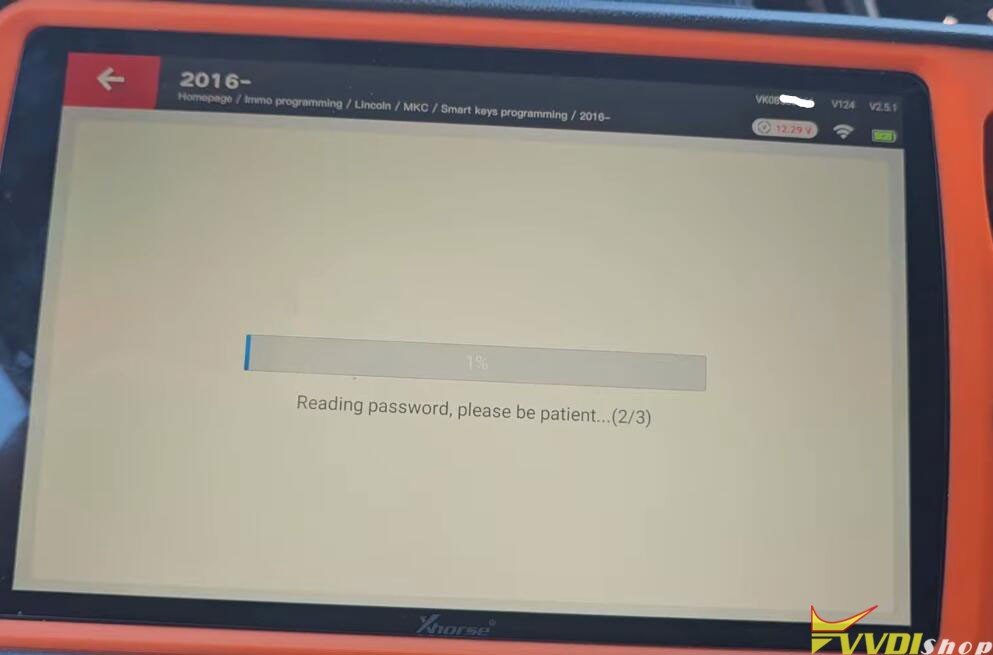

Reading password is in progress.
Switch ignition off and wait for 10 seconds, then switch ignition on.
Read password completed.

Select Add a key function in vvdi key tool plus.
Open then close the driver door. Turn off the ignition switch.
Insert the new key to be programmed to key slot.


Key programming successfully.


Switch ignition off wait 10 seconds then we’ll switch the ignition back on. It is done.
Xhorse VVDI Key Tool Plus and XNDP50 Program BMW EWS3 Key
Today we’re working on a 2004 BMW X5, this is a EWS3 module which already been pulled out of the car. Following we’re gonna show how to program a dealer key with Xhorse VVDI Key Tool Plus + XDNP50 EWS3 Adapter for it.
Step1. Read Immo Data
The first thing we should do is to open this plastic case of module, then connect it to the BMW EWS3 Adapter.
.jpg)
.jpg)
.jpg)
Here we can check the wiring diagram:
Prog >> IMMO >> BMW >> EWS3 >> Adapter
After successfully connecting, read & save the file.
Read >> EEPROM >> Start >> Continue
Save EEPROM file.
.jpg)
.jpg)
.jpg)
Step2. Make Dealer Key
Immo programming >> BMW >> Select from system >> EWS immo system >> Prepare dealer key from EEPROM dump >> Start programming >> EWS3 >> Load EEPROM dump file >> Selected a blank key position
Please put new key into VVDI Key Tool Plus programmer.
Start make key, please wait…
Make dealer key success.
So now this key can be used to start the car, the remote would have to be programmed separately.
* Please notice after programming the key, the EWS module will not recognize the slot as being used until the key is actually used in the car.
.jpg)
.jpg)
.jpg)