ابزار Xhorse VVDI

Xhose VVDI نرم افزار برنامه نویس اصلی و سخت افزار

ابزار Xhorse VVDI

Xhose VVDI نرم افزار برنامه نویس اصلی و سخت افزار

Read 2014 Kia Sportage pin code with VVDI Key Tool

As titled, here’s the step-by-step guide on 2014 Kia Sportage keyless entry remote fob programming using Xhorse VVDI Key Tool remote generator.

Device used:
VVDI universal remote for VVDI Key Tool


Step 1: Read PIN Code
vvdi-key-tool-kia-sportage-1
Insert original remote into left coil of Keytool
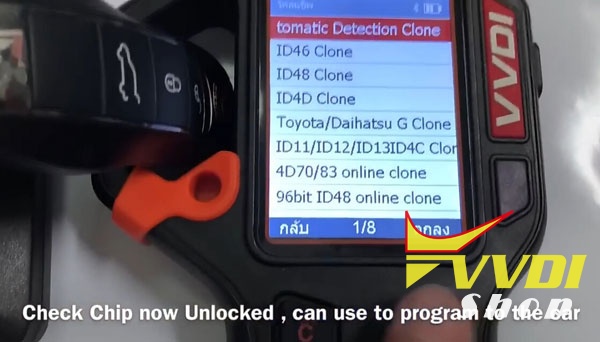
Select Automatic Detection Clone
vvdi-key-tool-kia-sportage-2
Detect remote type: ID46 HITAGS PCF7936
vvdi-key-tool-kia-sportage-4
vvdi-key-tool-kia-sportage-5
Connect vvdi remote pcb with VVDI Keytool
Select Remote Program->Asia->Kia->Sportage->NYODD4TX1306-TFL 14-16
vvdi-key-tool-kia-sportage-6
vvdi-key-tool-kia-sportage-7
vvdi-key-tool-kia-sportage-8

vvdi-key-tool-kia-sportage-9
vvdi-key-tool-kia-sportage-10

Remote frequency 433MHZ
Writing data
vvdi-key-tool-kia-sportage-11

Write data success.
vvdi-key-tool-kia-sportage-12
Now start to read the pin code via the key
vvdi-key-tool-kia-sportage-13
vvdi-key-tool-kia-sportage-14
vvdi-key-tool-kia-sportage-15

Select Mode1 data acquisition mode
Put the KEYTOOL head antenna near the ignition coil, press OK to sniff data
vvdi-key-tool-kia-sportage-16

Insert the original key into the left coil and press OK to start the calculation.
In calculate progress, don’t move the key.
vvdi-key-tool-kia-sportage-17
Calculate success.
vvdi-key-tool-kia-sportage-18

Move to get More Function
vvdi-key-tool-kia-sportage-19

Select Hyundai Password
vvdi-key-tool-kia-sportage-20

VVDI Key tool read password success.

Step 2: Program remote
Now we will do remote programming with Xtool X100 PAD2
xtool-x100-pad2-kia-sportage-1

Select Immobilizer->Kia->Program Immobilizer/Remote->Select from type->Program remote->16 PIN->Type 1->Program remotes
xtool-x100-pad2-kia-sportage-2

xtool-x100-pad2-kia-sportage-3

xtool-x100-pad2-kia-sportage-4

Switch on ignition and turn off, then remove key
xtool-x100-pad2-kia-sportage-5
xtool-x100-pad2-kia-sportage-6

Program remote: press LOCK or UNLOCK for more than 1 sec.
xtool-x100-pad2-kia-sportage-7

Remote programming complete, click YES to program next remote.
xtool-x100-pad2-kia-sportage-8

Press LOCK or UNLOCK button of vvdi remote key for more than 1 sec
xtool-x100-pad2-kia-sportage-9

Program complete


Step 3:  Make key programming
Now we make key programming process
xtool-x100-pad2-kia-sportage-10

Select Type4 (CAN)->Program keys
xtool-x100-pad2-kia-sportage-11

Insert a key to be programmed, turn ignition on.
Xtool X100 PAD2 will ask pin code to access.
xtool-x100-pad2-kia-sportage-12

Enter pin code read by VVDI Key Tool
1st key program success
xtool-x100-pad2-kia-sportage-13

Press YES to program next key.
Insert next key to be programmed. Turn ignition on.
2nd key program success
xtool-x100-pad2-kia-sportage-14

Turn ignition off, wait for 10 seconds, then turn ignition on
Programming is completed.
xtool-x100-pad2-kia-sportage-15
Test the new vvdi remote, works no issue.

http://www.vvdishop.com/service/vvdi-key-tool-read-2014-kia-sportage-id46-pin-code-8067.html

VVDI Prog Read BMW Land Rover EWS3D module

BMW EWS3D module is different from regular EWS3 module.  Ews3D can be found in bmw Z3 and some older Land Rovers.
bmw-ews3d-module
BMW EWS III D
EWS Ill D is installed on E36/7 beginning of production 99 Model Year. The system does not have a K-Bus input.
Purpose of the System
The purpose of the EWS 3 D system is to provide the highest level of drive away protection available to vehicles without a K-Bus. The input side of the control module functions the same as an EWS II (no bus inputs) system with the exception of an integrated EWS module and transmitter/receiver module. The output side functions similar to an EWS Ill (3.3) system with “Rolling codes”. The EWS Ill D control module is on the D-Bus for diagnostics.
Individual component inputs and system operation is the same as the mentioned previous systems.

Land rover EWS3D:
LAND ROVER FREELANDER 2001 2004 EWS 3.D MODULE YWC106631

BMW EWS3D wiring connection with Xhorse VVDI Prog programmer
EWS3D pinout
ews3d-pinout
EWS3D back side
ews3d-back-side
EWS3D 0D46J wiring connection to VVDI Prog and Xhorse EWS3 adapter
ews3d-pinout-to-vvdi-prog
Credit to DK Veteran nickolasd.

Xhorse EWS3 Adapter instruction:
xhorse-ews3-adapter-1
xhorse-ews3-adapter-2

How to Program Hyundai i30 smart key with Xhorse VVDI Key Tool

How to: generate smart key on a Hyundai i30 2014 using VVDI Key Tool remote maker and Xhorse universal proximity key.

Disassemble the universal smart key, install battery and then install the smart key
vvdi-key-tool-hyundai-i30-1
vvdi-key-tool-hyundai-i30-2
vvdi-key-tool-hyundai-i30-3
vvdi-key-tool-hyundai-i30-4
vvdi-key-tool-hyundai-i30-5
vvdi-key-tool-hyundai-i30-6
In VVDI Key tool remote maker, select Remote/Smart Program->Smart Key Prox->KIA->K2
vvdi-key-tool-hyundai-i30-7
vvdi-key-tool-hyundai-i30-8
vvdi-key-tool-hyundai-i30-9
vvdi-key-tool-hyundai-i30-10
Insert the xhorse universal smart key into the  induction coil of VVDI keytool.
Detects key frequency : 433MHz
vvdi-key-tool-hyundai-i30-11
Press Generate
vvdi-key-tool-hyundai-i30-12
Writing data until success
vvdi-key-tool-hyundai-i30-13
Test thew remote control and start car.
vvdi-key-tool-hyundai-i30-14
vvdi-key-tool-hyundai-i30-15
vvdi-key-tool-hyundai-i30-16
New smart key works no issue.

VVDI Key Tool Clone Lincoln 2007 4D63 Chip Key

How to: clone a 4D63 transponder chip key to a Lincoln year 2007 using Xhorse VVDI Key Tool remote maker.
vvdi-key-tool-lincoln-4d63-1
vvdi-key-tool-lincoln-4d63-2
Insert original transponder into induction coil
Select Transponder Clone
vvdi-key-tool-lincoln-4d63-3
Identify transponder information: ID63 chip
vvdi-key-tool-lincoln-4d63-4
Click on Read
Reading chip data
Read Ok
vvdi-key-tool-lincoln-4d63-5
Calculating data
vvdi-key-tool-lincoln-4d63-6
Calculate success
vvdi-key-tool-lincoln-4d63-7
Take out the key from VVDI Key Tool coil
Put special 4D chip into coil and press OK to clone data
vvdi-key-tool-lincoln-4d63-8
Writing data
vvdi-key-tool-lincoln-4d63-9
Write data success
Clone success
vvdi-key-tool-lincoln-4d63-10
Test the new transponder key
Works!

Xhorse Condor XC-Dolphin vs. Condor XC-Mini

Xhorse have been busy working on the new CNC key cutting machine- XC-Dolphin.
It is a small, compact machine with 10kg of weight.
And of course as everything new these days – it is controlled by connecting to your phone by Bluetooth. Possible to connect to computer too.
Condor XC-Dolphin vs. Condor XC-Mini
Condor XC-Dolphin key machine is an entry-level product of the CONDOR CNC machine family. The body design is simple, it is very suitable for mobile use in the mobile scene, without operating screen, you need to connect a mobile phone or tablet, and install a dedicated APN.
indexXC-DOLPHIN
Condor XC-MINI
SpindleMechanical shaft +60W DC motor (with a foreign model)” “Electric spindle brushless 300W, built-in angular contact bearingElectric spindle brushless 300, built-in angular contact bearing
Transmission mechanism“T-shaped screw + anti-backlash nutBall screw
guideRoller guideCross-track
shellBase aluminum alloy die-casting, the upper body is made of plastic shell and the body is made of integrated aluminum alloy die-casting.Plastic outer casing body is formed by body alloying die casting
FixtureStandard fixtureTwo sets of standard fixtures
ManipulationNo touch screen, no built-in databaseQuick start, with touch screen, built-in database
Offline operationnot supportstand by
Dedicated appSupport dedicated mobile phone APpSupport dedicated mobile APP
Built-in batteryNot supported, optional external batterystand by
protecting maskSimple protective coverComprehensive protection
VVD bindingnot supportstand by
Cutting speed1X SPEED2X SPEED
weight<10kg18kg
Warranty1 year3 years
Note: Condor XC-Dolphin is not yet for sale now.
condor-xc-Dolphin-1

condor-xc-Dolphin-2

condor-xc-Dolphin-3