ابزار Xhorse VVDI
Xhose VVDI نرم افزار برنامه نویس اصلی و سخت افزارابزار Xhorse VVDI
Xhose VVDI نرم افزار برنامه نویس اصلی و سخت افزارFree Download V4.6.1 Xhorse VVDI Prog Programmer
Xhorse VVDI Prog ecu, mcu, eeprom programmer software released to V4.6.1 (2017-08-30).
VVDI Prog V4.6.1 Update Feature:
* This version DON’t need update firmware
* Fix some bugs
+ Add VVDI PROG USER MUNUAL 4.6.1version in Doc folder
* Fix MC9S12XS/MC9S12XHY series PFLASH write error problem
* Fix SRS-VW52-V1 diagram
+ Add AT24C01(CLIP),AT24C02(CLIP), AT24C04(CLIP), AT24C08(CLIP), AT24C16(CLIP), AT24C32(CLIP), AT24C64(CLIP), AT24C128(CLIP), AT24C256(CLIP),
AT24C512(CLIP), AT24C1024(CLIP), AT25010(CLIP), AT25020(CLIP), AT25040(CLIP), AT25080(CLIP), AT25160(CLIP), AT25320(CLIP), AT25640(CLIP), AT25128(CLIP),
AT25256(CLIP), AT25512(CLIP), AT93C06[A](CLIP), AT93C46[A](CLIP), AT93C56[A](CLIP), AT93C57[A](CLIP), AT93C66[A](CLIP), AT93C76[A](CLIP),
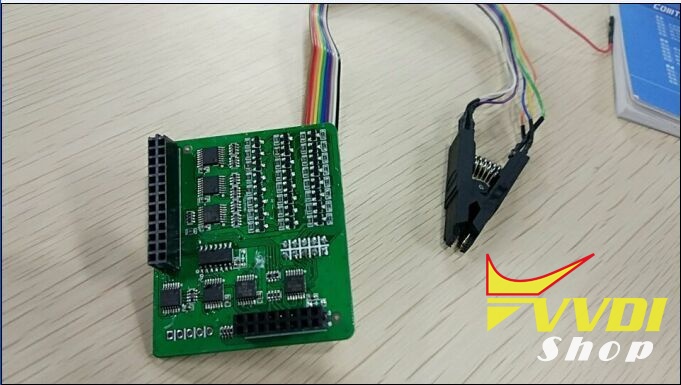
AT93C86[A](CLIP) options in <1-EEPROM&FLASH>-><ATMEL(CLIP)> (Need EEPROM CLIP ADAPTER)
+ Add CAT24C/W01(CLIP), CAT24C/W02(CLIP), CAT24C/W04(CLIP), CAT24C/W08(CLIP), CAT24C/W16(CLIP), CAT24C/W32(CLIP), CAT24C/W64(CLIP), CAT25C128(CLIP),
CAT25C256(CLIP), CAT93C46[A](CLIP), CAT93C56[A](CLIP), CAT93C57[A](CLIP), CAT93C66[A](CLIP), CAT93C76[A](CLIP), CAT93C86[A](CLIP) options in
<1-EEPROM&FLASH>-><CATALYST(CLIP)> (Need EEPROM CLIP ADAPTER)
+ Add XL[S]24C01(CLIP), XL[S]24C02(CLIP), XL[S]24C04(CLIP), XL[S]24C08(CLIP), XL[S]24C16(CLIP), XL[S]93C/LC06(CLIP), XL[S]93C/LC46(CLIP), XL[S]93C/LC56(CLIP),
XL[S]93C/LC66(CLIP) options in <1-EEPROM&FLASH>-><EXEL(CLIP)> (Need EEPROM CLIP ADAPTER)
+ Add FM24C02(CLIP), FM24C03(CLIP), FM24C04(CLIP), FM24C08(CLIP), FM24C09(CLIP), FM24C16(CLIP), FM24C17(CLIP), FM93CS06(CLIP), FM93CS46(CLIP), FM93CS56(CLIP),
FM93CS66(CLIP), NM24C02(CLIP), NM24C03(CLIP), NM24C04(CLIP), NM24C05(CLIP), NM24C08(CLIP), NM24C09(CLIP), NM24C16(CLIP), NM24C17(CLIP), NM24U17(CLIP),
NM24C32(CLIP), NM24C65(CLIP), NM93C06(CLIP), NM93C46(CLIP), NM93C56(CLIP), NM93C66(CLIP), NM93C86(CLIP), NM93CS06(CLIP), NM93CS46(CLIP), NM93CS56(CLIP),
NM93CS66(CLIP) options in <1-EEPROM&FLASH>-><FAIRCHILD(CLIP)> (Need EEPROM CLIP ADAPTER)
+ Add 24AA02(CLIP), 24AA04(CLIP), 24AA08(CLIP), 24AA16(CLIP), 24AA164(CLIP), 24AA32(CLIP), 24AA128(CLIP), 24AA256(CLIP), 24C02(CLIP), 24C04(CLIP), 24C32(CLIP),
24LC02(CLIP), 24LC04(CLIP), 24LC08(CLIP), 24LC16(CLIP), 24LC164(CLIP), 24LC32(CLIP), 24LC64(CLIP), 24LC65(CLIP), 24LC128(CLIP), 24LC256(CLIP),
93C/LC/AA46A(CLIP), 93C/LC/AA56A(CLIP), 93C/LC/AA66A(CLIP), 93C/LC/AA76A(CLIP), 93C/LC/AA86A(CLIP), 93C/LC/AA46B(CLIP), 93C/LC/AA56B(CLIP), 93C/LC/AA66B(CLIP),
93C/LC/AA76B(CLIP), 93C/LC/AA86B(CLIP), 93C/LC/AA46C(CLIP), 93C/LC/AA56C(CLIP), 93C/LC/AA66C(CLIP), 93C/LC/AA76C(CLIP), 93C/LC/AA86C(CLIP) options in
<1-EEPROM&FLASH>-><MICROCHIP(CLIP)> (Need EEPROM CLIP ADAPTER)
+ Add M24C01(CLIP), M24C02(CLIP), M24C04(CLIP), M24C08(CLIP), M24C16(CLIP), M24C32(CLIP), M24C64(CLIP), M24C128(CLIP), M24C256(CLIP), M24C512(CLIP),M93C06(CLIP),
M93C46(CLIP), M93C56(CLIP), M93C66(CLIP), M93C76(CLIP), M93C86(CLIP), M95010(CLIP), M95020(CLIP), M95040(CLIP), M95080(CLIP), M95160(CLIP), M95320(CLIP), M95640(CLIP),
M95128(CLIP), M95256(CLIP), M95512(CLIP), ST24C01(CLIP), ST24C02(CLIP), ST24C04(CLIP), ST24C08(CLIP), ST24C16(CLIP), ST24E16(CLIP), ST24E32(CLIP), ST24W02(CLIP),
ST24W04(CLIP), ST24W08(CLIP), ST24W16(CLIP), ST25C01(CLIP), ST25C02(CLIP), ST25C04(CLIP), ST25C08(CLIP), ST25C16(CLIP), ST25E16(CLIP), ST25E32(CLIP), ST93CS56(CLIP),
ST93CS57(CLIP), ST93CS66(CLIP), ST93CS67(CLIP), ST93CS47(CLIP), ST93CS46(CLIP) options in <1-EEPROM&FLASH>-><ST(CLIP)> (Need EEPROM CLIP ADAPTER)
+ Add X24C01(CLIP), X5043(CLIP), X5045(CLIP) options in <1-EEPROM&FLASH>-><ST(CLIP)>(Need EEPROM CLIP ADAPTER)
+ Add ME7.4.5-FLASH-ST10F275, ME7.4.5-EEPROM-95320 options in <3-ECU>-><BOSCH>
+ Add BCM2(D70F3380) option in <4-IMMOBILIZER>-><AUDI>
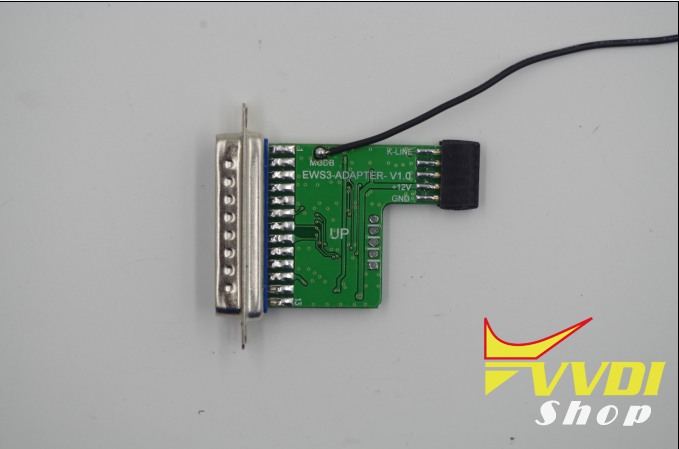
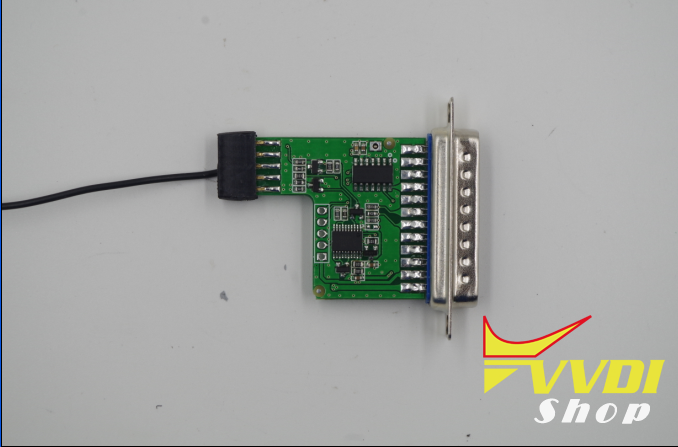
+ Add EWS3-KLINE(0D46J) option in <4-IMMOBILIZER>-><BMW> (Need EWS3 ADAPTER)
+ Add BCM-XEP100(2009–) option in <4-IMMOBILIZER>-><LANDROVER>
+ Add LAGUNA-UCT(2006) option in <4-IMMOBILIZER>-><RENAULT>
+ Add BCM2(D70F3380) option in <4-IMMOBILIZER>-><VOLKSWAGEN>
+ Add BJ40-DASHBORAD, E150-DASHBORAD(2014), EX200-BCM(2016) options in <5-DASHBORAD>-><BAICMOTOR>
+ Add EQ-DASHBOARD(2017) option in <5-DASHBORAD>-><CHERY>
+ Add AUTOPLEAD-DASHBOARD(2017) option in <5-DASHBORAD>-><DAYUN>
+ Add IEV-DASHBOARD(2017) option in <5-DASHBORAD>-><JAC>
+ Add BEETLE-DASHBOARD(2005), BEETLE-DASHBOARD(2010) options in <5-DASHBORAD>-><VOLKSWAGEN>
+ Add REGAL-SRS(2014) option in <7-ARIBAG>-><BUICK>
+ Add GOLF7-SRS option in <7-ARIBAG>-><VOLKSWAGEN>
+ Add A6L-C7-EPB-MODULE option in <8-OTHER>-><AUDI>
+ Add 300C-PDC-MODULE(2007–) option in <8-OTHER>-><CHRYSLER>
+ Add MAGOTAN-LEW-MODULE, POLO-J393-EEPROM, TIGUAN-EPB-MODULE options in <8-OTHER>-><VOLKSWAGEN>
VVDI2 VAG Program Audi Q7 2007 Remote key by OBD
Here vvdishop introduces 2 ways to program remote smart key on a Audi Q7 year 2007 with Xhorse VVDI2 key programmer by OBD.
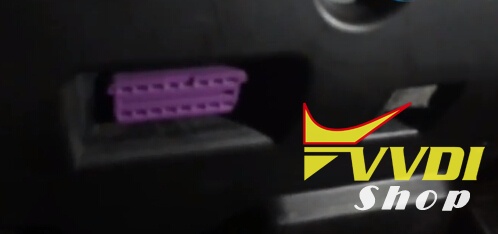
Connect Xhorse VVDI2 VAG key programmer with vehicle through OBD connector
Audi Q7 OBD diagnostic connector location

The remotes to be programmed use ID8E transponder
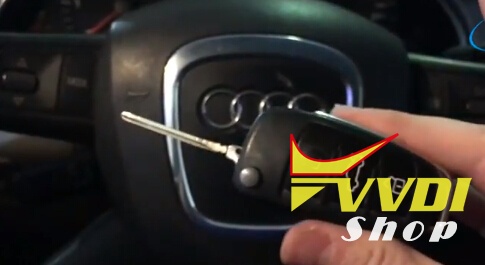

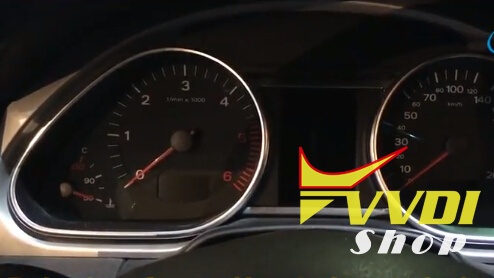
First, we show how one of the two remotes is deprogrammed
Original key can turn on the switch, remote key to be programmed cannot.
Method 1:
Open VVDI2 software
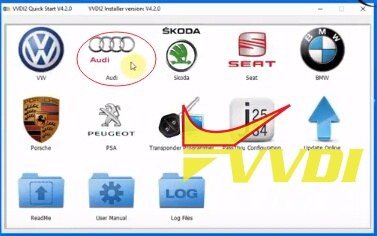
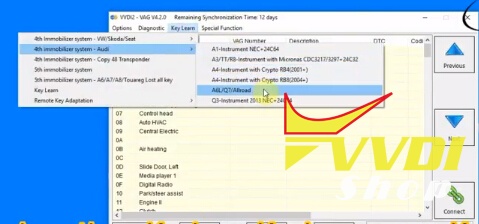
Select Audi->Key Learn-> 4th Immobilizer system-Audi-> A6L/Q7/Allroad
Turn ignition ON
We extract the necessary information (Pin Code and Security Code) of the vehicle to access and be able to perform the final process of programming (Key Learn)
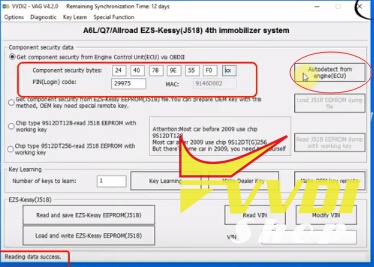
Select Autodetect from engine (ECU)
Reading data, please wait
Reading data success
We observe on the above screen the information of security codes (Pin Code and Security Cop) extracted correctly
Let’s go to the final programming process (Key Learning)
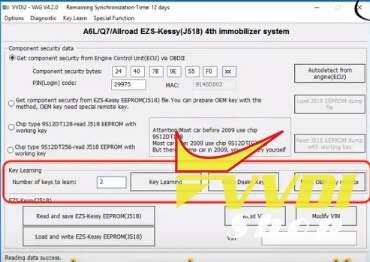
Enter number of keys to learn: 2
and press Key Learning button
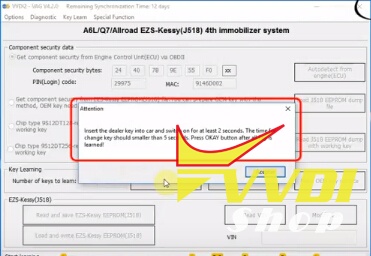
Insert the dealer key into car and switch on for at least 2 seconds. The time for change key should within 5 seconds. Press OKAY button after all key is learned.

All keys successfully learned.
Method 2:
Next, we will see another method of programming.
In this case, more direct and automatic.
And with information on the status of immobilizer and possible vehicle lock by incorrect Pin Code or transponder to
real-time on-screen.
In VVDI2 Audi Menu
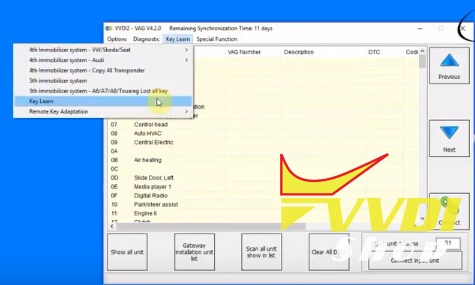
Select Key Learn->Key Learn
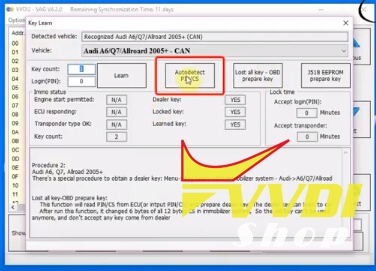
Auto detect vehicle: A6L/Q7/Allroad 2005+, CAN
Select Autodetect PIN/CS
Automatic detection / extraction of the security codes (Pin Code and Comp. Of Security)

Real-time status information of the Immobilizer: type of key / transponder and its status, access to units, number of keys programmed
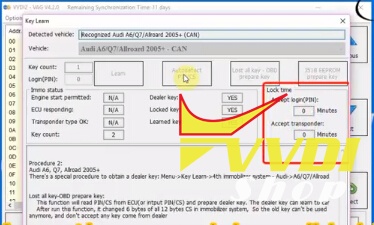
Real-time information on possible vehicle lockout and remaining time for leaving it
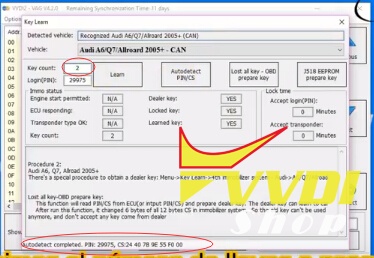
PIN and CS Security codes successfully extracted
Enter key number in marked red area: 2
Press Learn button
Insert entry key and switch on ignition
We accept OK to finish the process once the steps are done correctly
Test the new programmed remote key.
VVDI Mercedes vs. AVDI vs. Diagspeed
Question before entering:
we know these tools (Diagspeed, AVDI and VVDI MB) can do 204 lost key but which one is better / more reliable? And support?
Locksmith experiences and suggestions:
1.
VVDI MB Tool can do W204 all key lost yet too..
i think via latest video is real reading right pass, no any change eis dump
check post:
VVDI MB BGA W204 all keys lost and token feedback
2.
AVDI just needs to connect to Kline on EIS EZS & easiest way to do is get extra wire from Kline
at ESL connector to pin 7 OBD,no adapter necessary
3.
Diagspeed MB Key OBD2 and AVDI are on the top now for MB key , but some gaps :
AVDI cannot read pass from BE key also cannot repair ELV fatal ,but his the best for gearbox and ecu renew ,programming and coding , and you can do all keys lost on w204 without need to have the ezs on bench .
Diagspeed is one of the best ,can repair ELV fatal error and read pass from BE keys and have many other functions.
AVDI can’t read ROM51 password from key.
AVDI kills radio bytes in key (as it has for the last 2 years).
AVDI makes your use their own keys or original Mercedes keys, can’t use BE keys.
AVDI will not display password so you can program keys using other tools.
AVDI only calculates 1 key at a time, no option for all keys.
AVDI does not let you save the keys for later use.
In short, if you want something for keys, buy a VVDI MB BGA Tool.
4.
Just done 2x W204 lost keys with Diagspeed….
35 mins to read, 10 minutes for password from server..
Diagspeed can do W204 also W207 next challenge Roy going after W164 and W221
5.
Application list is better on Avdi, it can do more, esl stuff, gearbox, ecu etc. The down side is the price is expensive.
VVDI Mercedes is prob better value for money for someone starting off.
Hope that helps.
http://blog.vvdishop.com/vvdi-mb-bga-tool-vs-diagspeed-vs-avdi/
Disable Mercedes E260L 2011 key with VVDI MB
Guide to disable Mercedes E260L 2011 key by using Xhorse VVDI MB BGA Tool Mercedes key programmer.
Key information:
Original key: 3 button semi intelligent key
Frequency: 433MHz
Start: insert key to start engine
Disable key device: VVDI MB
Procedure:

1.Connect VVDI MB Tool with vehicle via OBD diagnostic socket. Turn ignition switch to ON position.
Open VVDI MB BGA software, select EIS-> Read EIS data and then save data.
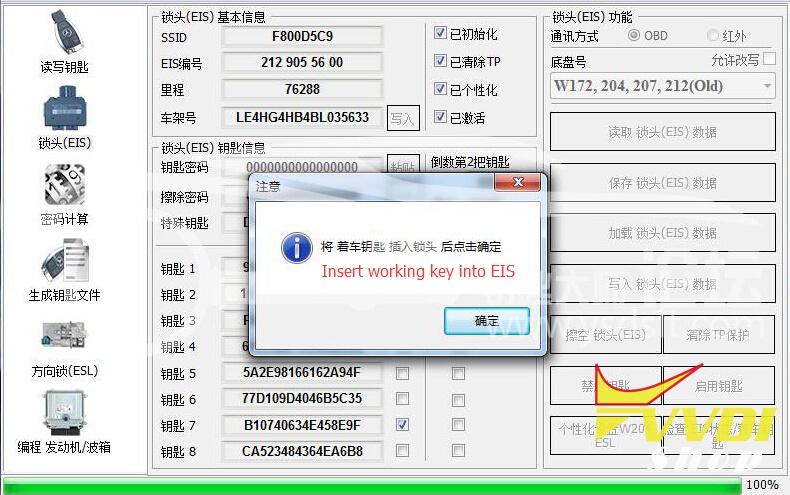
2. Insert key into EIS
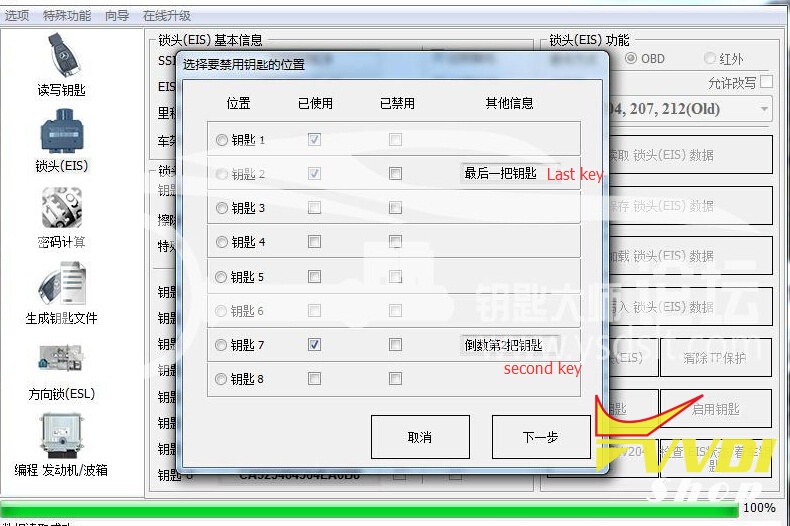
3. VVDI MB will prompt key position to be disabled
Note: VVDI Mercedes shows the last used key number #2, second used key number #7, so Key 2 and Key 7 are the working keys. Do not disable key 2 and key 7. We need to disable key 1.
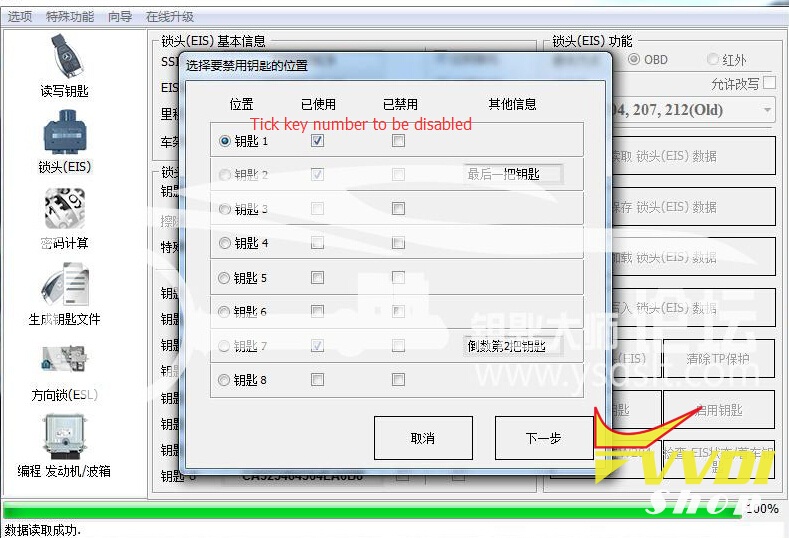
4. Tick the key 1 to be disabled

Warning:
After disable key 1, it will not start car. You cannot add key on this position neither. Are you sure to disable key 1? Press YES to continue.
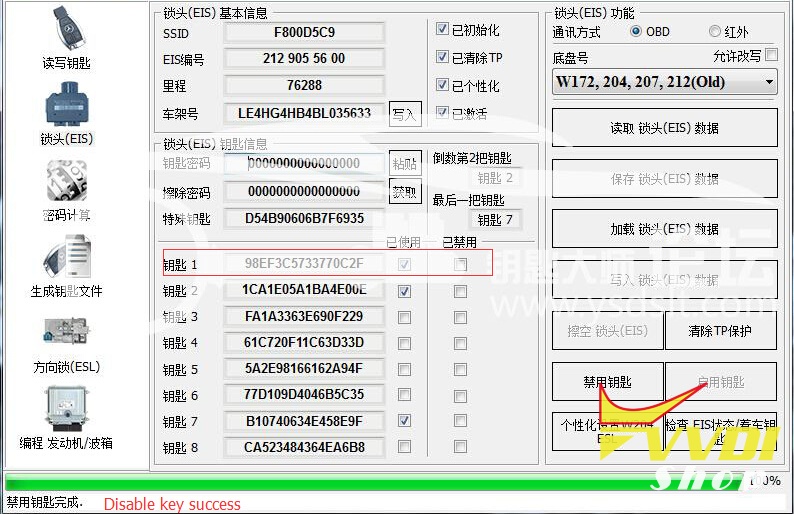
5. VVDI MB Tool disable Mercedes key success!
http://blog.vvdishop.com/disable-mercedes-e260l-key-with-vvdi-mb-bga-tool/
How to program BMW FEM BDC key by VVDI2 V4.3.0
Xhorse VVDI2 key programmer V4.3.0 software released BMW FEM/BDC system key programming function.
*** Require firmware V4.3.0
************************************************* *********************
===== VAG V4.3.0 =====
1. Bugfix===== BMW V4.3.0 =====
1. Add BMW FEM/BDC system key learning, erase key
2. Add BMW FEM/BDC system reset KM
3. Add FEM/BDC syste backup coding, restore coding
4. Attention: FEM/BDC Key Learn is an option function, it require buy license or exchange with bonus points. Contact your dealer for help!===== Porsche V4.3.0 =====
1. Bugfix===== PSA V4.3.0 =====
1. Bugfix===== Transponder Programmer V4.3.0 =====
1. Bugfix
===== J2534 V4.3.0 =====
1. Bugfix
===== Online Upate Tool V4.3.0 =====
1. Bugfix
===== Quick Start V4.3.0 =====
1. Bugfix
 https://mega.nz/#!W1pSRRTL!0n8OX4wshaB1s0O06SDhTR0KvO32nPHZWg4CQjBMdrA
A: Yes.
VVDI2 – BMW FEM/BDC system(function released and available, just no user manual)
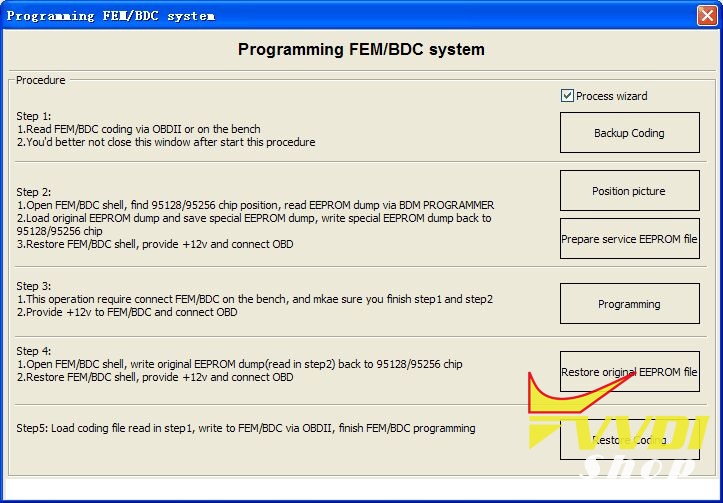
Users can refer to following information (3 steps for make keys:get key info->programming FEM/BDC system->make keys)
1.support make new key with ignition switch(support add spare key and all key lost, all key lost require ISN)
2.support reset FEM/BDC KM(cluster require reset manually)
3.support erase key(after erase the key position become blank position)
4.support backup coding
5.support restore coding
Notes:
1.backup coding and restore coding can direct operation generally.
2.add keys, reset KM, erase key must programming FEM/BDC system first
3.in FEM/BDC interface, if ‘get key info’ the type not support, it will show:customer should use “BMW E-sys software” program FEM/BDC system.then programming FEM/BDC system with VVDI2 BMW
4.when operation on ‘programming FEM/BDC system’interface,please don’t close this software window until all procedures completed.
5.programming FEM/BDC system, require soldering and get eeprom.(FEM 95128 chip, BDC 95256 chip)usually there are 2 same chips on the module, please refer to the software diagram, select the correct one.
6.programming FEM/BDC system,must restore the original eeprom, restore coding.if cannot restore coding or after restore coding assemble FEM/BDC module back to car,but with problem(such as the remote control cannot start the car
or the car with window problem)please use “BMW E-sys software” coding for FEM/BDC system
7.if connect power to FEM/BDC module, but the relay keep ringing,please contact technical support for help.usually operation on FEM/BDC should be ok,just need to programming.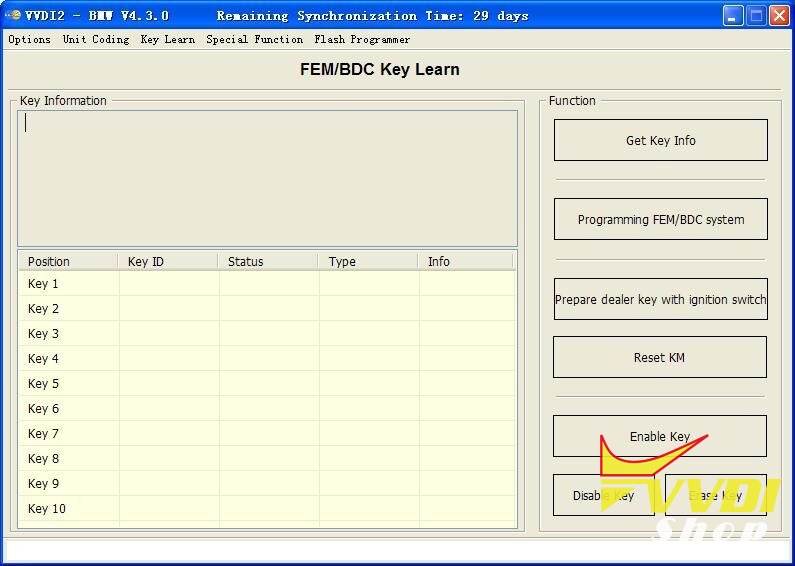
without condor: BMW FEM/BDC = 800usdPls note:
1.Your vvdi2 must already has BMW OBD functions
2.After payment, pls give us serial number of VVDI2 and condor(if you have)
Instructions of FEM/BDC:http://www.vvdishop.com/info/how-to-use-the-bmw-fem-bdc–18197.html
BMW FEM/BDC Authorization for VVDI2 (With Condor)
BMW FEM/BDC Authorization for VVDI2 (Without Condor)
VVDI 2 Updated to V4.3.1 (2017-08-18)
Free Download VVDI2 V4.3.1 Software
For 4.3.0 software users, just download 4.3.1 directly, no need update firmware again.
Require firmware V4.3.0
************************************************* *********************
===== VAG V4.3.1 =====
1. Copy 48 function: Support Passat B6/CC with 48 transponder
2. Bugfix
===== BMW V4.3.1 =====
1. Improvement for BMW FEM/BDC key learn
2. Bugfix
===== Porsche V4.3.0 =====
1. Bugfix
===== PSA V4.3.0 =====
1. Bugfix
===== Transponder Programmer V4.3.0 =====
1. Bugfix
===== J2534 V4.3.0 =====
1. Bugfix
===== Online Upate Tool V4.3.0 =====
1. Bugfix