ابزار Xhorse VVDI
Xhose VVDI نرم افزار برنامه نویس اصلی و سخت افزارابزار Xhorse VVDI
Xhose VVDI نرم افزار برنامه نویس اصلی و سخت افزارHow to use Xhorse Dolphin XP005 to cut key by biting?
Two ways of using the key bitting to make a key:
Method 1 :
Making a key without the original key.
1.Use some special tool to get the key bitting.
2.Break down the lock to read the key bitting on each metal of lock.
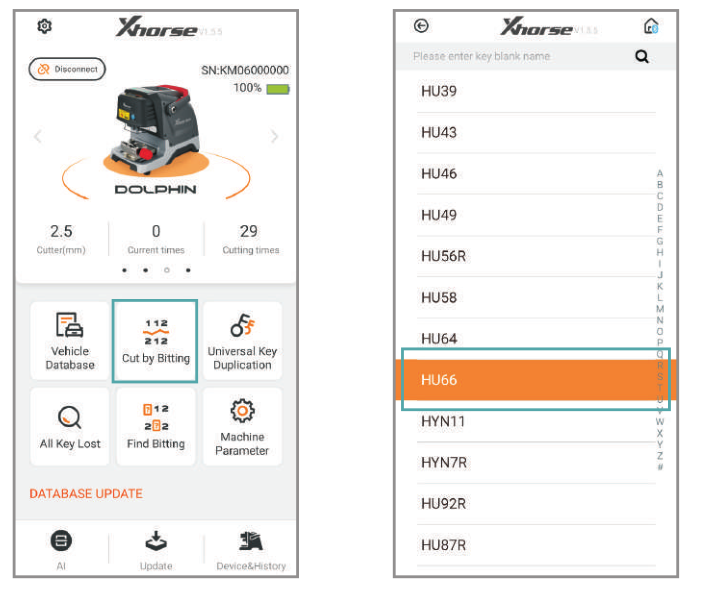
1) Click on “Cut by biting” on the main page
2) Select a key blank type
3) Select the ket type
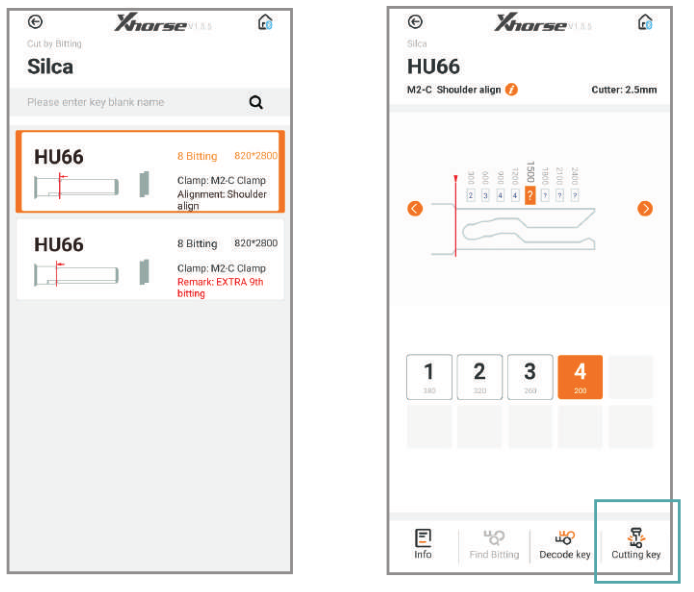
4) Fix the key according to the picture show, select proper side of clamp and fix the key in correct position.
Put in the key bitting and check all the information before you click on “Cutting key” for make new key.
2) Select a key blank type
3) Select the ket type
4) Fix the key according to the picture show, select proper side of clamp and fix the key in correct position.
Put in the key bitting and check all the information before you click on “Cutting key” for make new key.
Method 2:
Making a key with the original key.
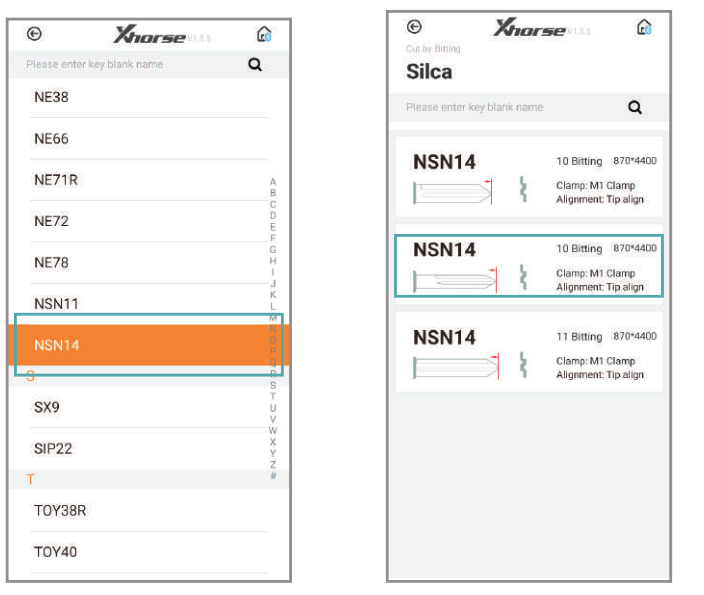
1) Click on “Cut by biting” and select a key blank type
2) Select the key type
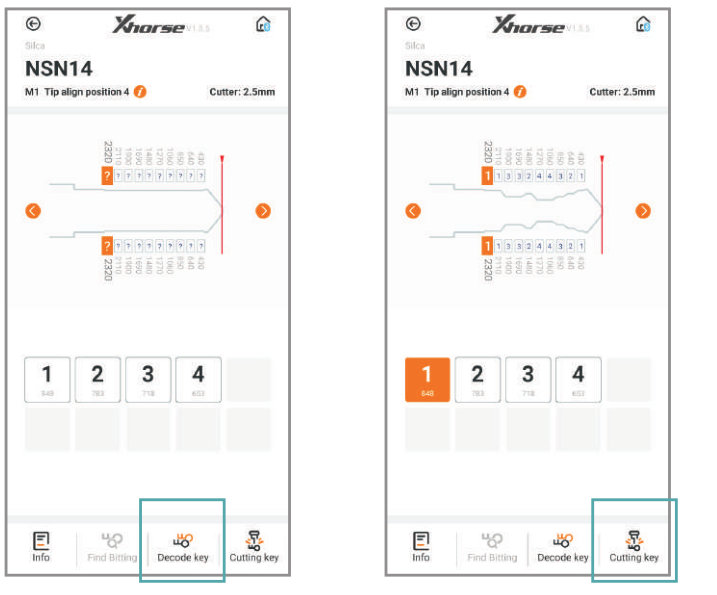
3) Click on “Decode key” to duplicate key biting
4) Click on “Cutting Key”
2) Select the key type
3) Click on “Decode key” to duplicate key biting
4) Click on “Cutting Key”
How to use Condor Dolphin XP005 to copy key?
Car models and years are needed for key duplication
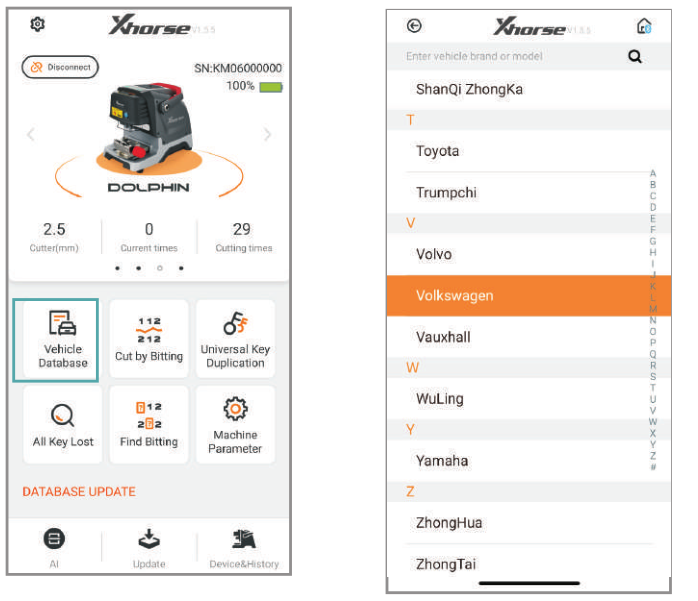
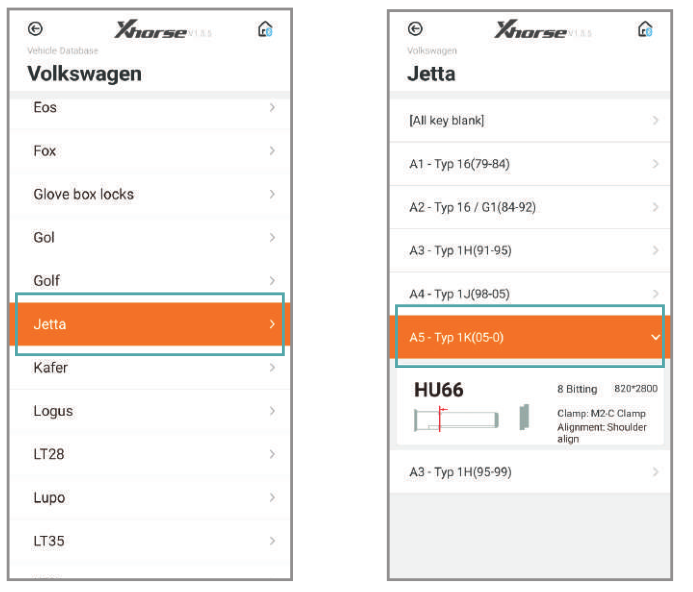
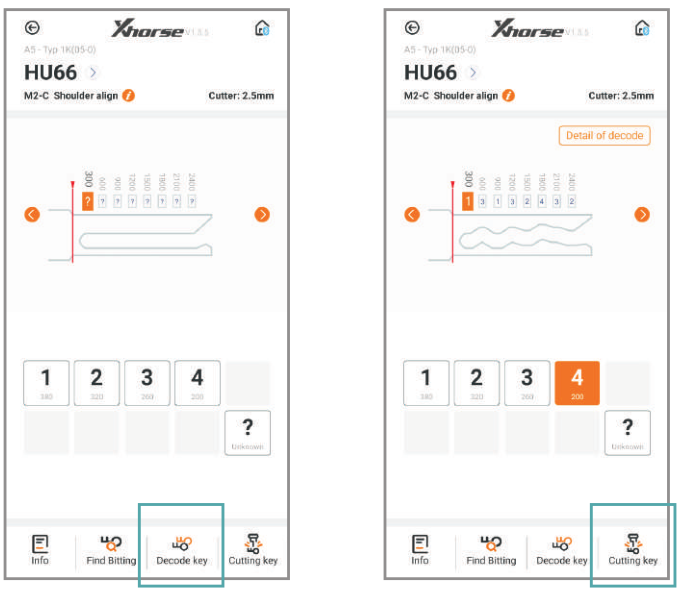
1) Click on “Vehicle Database” on the main page
2) Select or type the car maker
3) Select the car model
4) Select the car model and year
5) Follow the tips on screen and correctly put the key on the clamp, click “Decode key”
6) After getting the original key bit, put an new blank key and click on “Cutting Key”
2) Select or type the car maker
3) Select the car model
4) Select the car model and year
5) Follow the tips on screen and correctly put the key on the clamp, click “Decode key”
6) After getting the original key bit, put an new blank key and click on “Cutting Key”
How to use Xhorse Dolphin XP005 Key Database?
Three ways to make keys from the key database
1. Original key code card from factory
2. Key code information on lock for some car models
3. Other ways to get the key code.
1. Original key code card from factory
2. Key code information on lock for some car models
3. Other ways to get the key code.
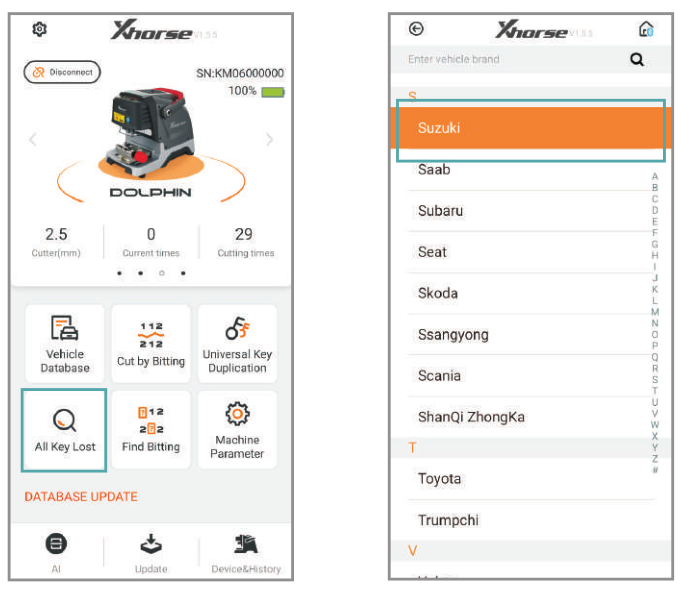
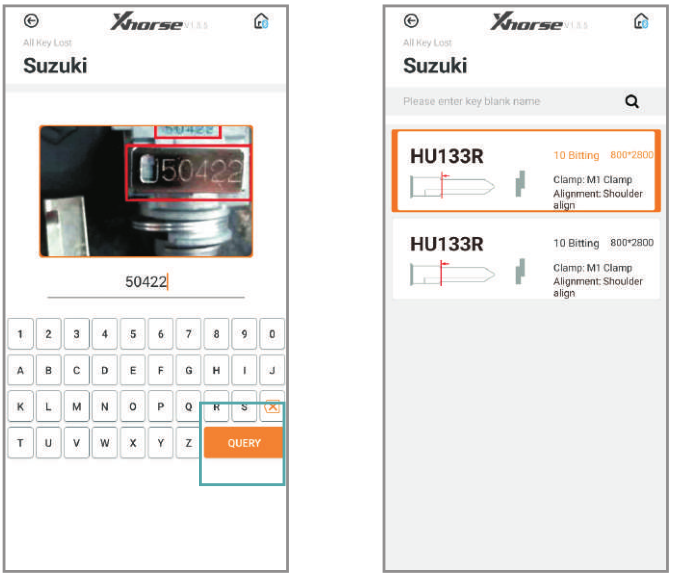
1) Click on “All key lost”
2) Select a car maker
3) Put in the key code circled and click “QUERY”
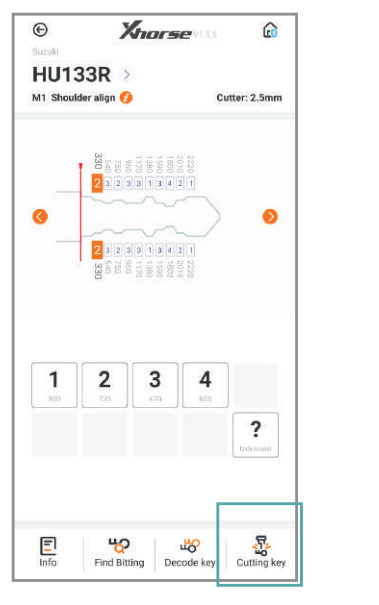
4) Select the key series
5) The key bit will be automatically generate on the screen. Click “Cutting Key”
2) Select a car maker
3) Put in the key code circled and click “QUERY”
4) Select the key series
5) The key bit will be automatically generate on the screen. Click “Cutting Key”
How to use VVDI Prog to read Delphi MT86 (3500) Gearbox?
Delphi MT86 (3500) Gearbox
Hyundai – Kia
Hyundai – Kia
-Read and write ok by ECU reflash cable
-Pinout some as VVDI-Prog manual
-Other operation some as picture
-Pinout some as VVDI-Prog manual
-Other operation some as picture

The power should be disconnect and connect before each operation.
Here comes one problem:
i am trying to clone mt86 with 2 infineon inside , i tried to read with vvdi prog the old ecu it says chip not connected i did exactly as the help in vvdiprog. The old ecu have only 3 coils working i don’t know what component is for the coils so i decided clone on other one.
car start with old ecu , and also i tried to read with combiloader it read flash normally i copied on donor ecu but car didnt start so i want to copy whole flash and eeprom with vvdi prog but always chip not connected.
Solution:
In the Delphi MT86 you have 2 Tricore _ TC1766 ( Motor + Gearbox )
To read TC1766 motor you should use this method :
Raise PIN 122 (PIN 122 should be lift).
To read TC1766 motor you should use this method :
Raise PIN 122 (PIN 122 should be lift).

Good luck.
How to Update Xhorse Dolphin XP005 Software?
Xhorse Condor Dolphin XP005 Key cutting machine Online Update
Database online update

1) Enter Dolphin XP-005 main interface and click “Update”
2) Click “Database update”
3) If you find a new version, click “Update” and download the new version. Click on “OK” after download database success.
2) Click “Database update”
3) If you find a new version, click “Update” and download the new version. Click on “OK” after download database success.
*If cellphone connected by mobile internet data, a prompt saying that download maybe costs data fee, recommend downloading by WiFi.
Upgrade by upgrade kit
Three ways to get the update package.
1. Contact us for the upgrade kit
2. Send an email titled “update tool” to support@ xhorse.com
3. Consult with online customer service on Xhorse App.
1. Contact us for the upgrade kit
2. Send an email titled “update tool” to support@ xhorse.com
3. Consult with online customer service on Xhorse App.
Steps to update both database and firmware with update package
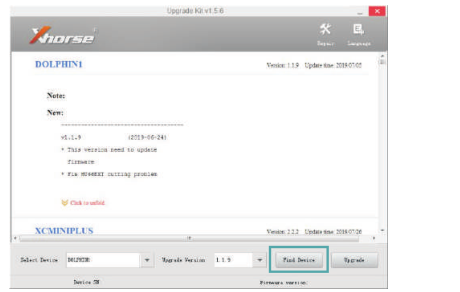
1) Connect the dolphin with a computer through USB cable, run ‘Upgrade Kit’ ,and click “Find Device”
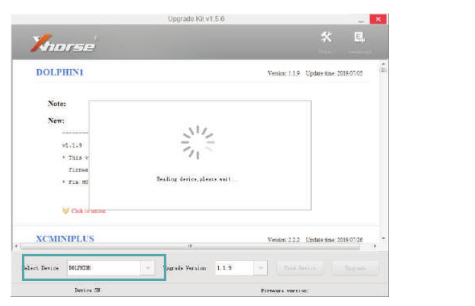
2) The connected device will be recognized and shown on left corner .
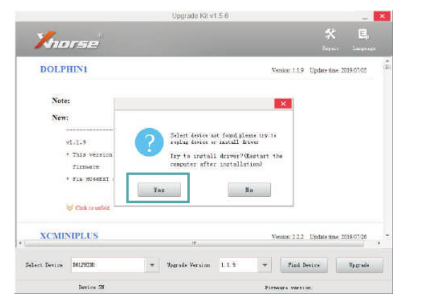
3) If the device cannot be found, follow the tips on screen and click ‘Yes’ to install driver.
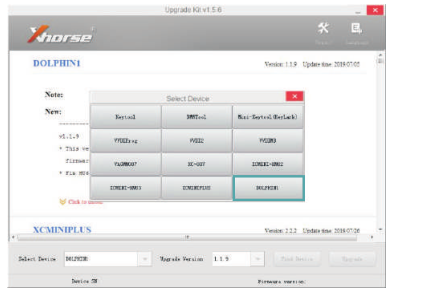
4) Select DOLPHIN1 and install driver.

5) When the dolphin machine is found, click ‘Upgrade’
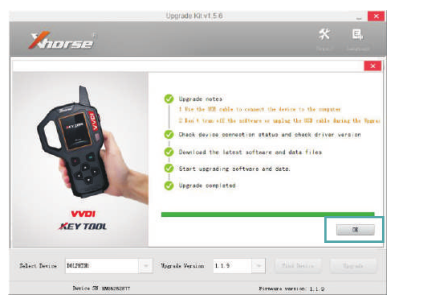
6) It takes a few minutes to complete upgrading. Please make sure the USB cable is always well connected when upgrading.