ابزار Xhorse VVDI
Xhose VVDI نرم افزار برنامه نویس اصلی و سخت افزارابزار Xhorse VVDI
Xhose VVDI نرم افزار برنامه نویس اصلی و سخت افزارVVDI Key Tool Plus and RH850 Cable Read MQB48 D70F3246
Xhorse tutorial: how to read VAG MQB48 NEC35XX locked RH850 D70F3426 processor dashboard with Xhorse vvdi key tool plus and RH850 cable.
Xhorse XDNPRBGL MQB-RH850/V850 Adapter is designed to read VW MQB48 dashboard data without cutting/ lifting any pins.

Support List:
MQB-RH850 (R7F)
MQB 34XX
IMMO4 JCI 34XX

Here take an example of RH850 D70F3426. D70F3426 cluster is more complex than the regular RH850 cluster.

You will need key tool plus, RH850 adapter and eeprom adapter
Procedure:
1.Read dashboard data
The function requires network connection.
Go to Immo Programming>>VW>>Select by Type>>MQB Immo System>>Dashboard-MQB48 (VDO/JCI-NEC35XX Locked)
Then select Read Immo data>>Read NEC35XX Chip>>Soldering>>R7F703426


solder RH850 adapter with cluster, then connect RH850 cable with key tool plus


Read and save IMMO Data

Remove RH850 cable from cluster
Restore capacitors

Remove 95128wt eeprom chip from cluster
Solder eeprom chip to eeprom adapter

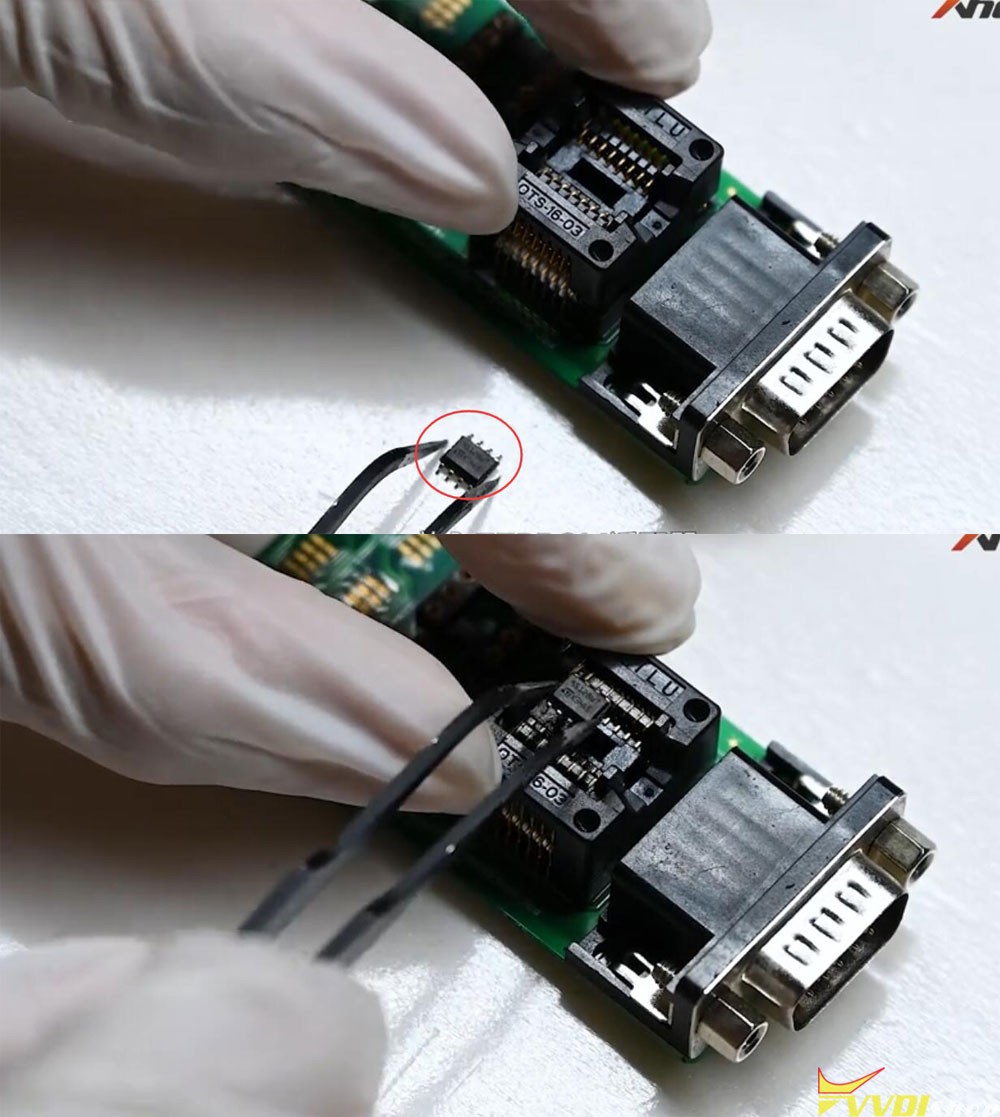
connect eeprom adapter with vvdi key tool plus via DB15 cable

Read and save eeprom 95128

Step 3: Get immo data
Select Get Immo data
Upload 95128 eeprom to calculate immo data online
Then save new immo data

Now you can generate dealer key and learn key with the calculated immo data.

Done.
VVDI MB Tool Power Adapter Reponse Error Solution
Problem:
My mb power adapter is working fine with vvdi key tool plus. But when connected with vvdi mb tool (12V 1.5a), it says MB Power Adapter Response Error. Any solution?

Solution:
Key tool plus MB power adapter cannot be used with VVDI MB. They use different mb power adapters for fast password calculation.


Vvdi Key Tool Plus MB Power Adapter
VVDI Key Tool Plus Program 2017 Toyota Highlander XM38 Key
Today I’ve got an 2017 Toyota Highlander working key from customer. Next I’m gonna add a key for this car with Xhorse VVDI Key Tool Plus via OBD.
- Program Remote
Remote program >> Remote cloud recognition >> Start testing >> Toyota smart key
Press LOCK button with working key nearby coil.
The second time to press LOCK button again.
Please put the key into Key Tool Plus coil, click OK to continue.
The programming remote was obtained successfully.
It’s a NX(13-19) KeylessGo 8A 312.10_314.35 remote.
Put the Toyota XM38 Smart Key into coil, click “Generate”.
VVDI Key Tool Plus starts to writing data…please wait.
Burn success.
.jpg)
.jpg)
.jpg)
.jpg)
.jpg)
- Add Key
IMMO programming >> Toyota >> Select from model >> Highlander >> 2009- >> Keyless Go >> Start programming >> Add key
Please switch ignition on.
The number of registered keys: 2
The number of keys that can also be registered: 5
Within 30s, keep touching the ignition switch with sign surface of working key.
Click OK, and keep touching the ignition switch with sign surface of the XM38 smart key within 30s.
Note: if key sound once, take the key farther away. If key sound twice, it is programmed successfully.
Key detected programming…
Please keep the key touching the ignition switch…
Make sure all steps are completed. Wait for registration to complete.
The number of registered keys: 3
The number of keys that can also be registered: 4
The matching is completed. If the key remote does not work, please use the “Synchronize ECU and ID” function (multiple synchronizations may be required) to synchronize the remote code.
Test the new key, it can work normally.
Perfectly done.
.jpg)
.jpg)
.jpg)
.jpg)
.jpg)
How to Change BMW CAS2 Mileage with VVDI Key Tool Plus
How-to: read eeprom and reset mileage to BMW E60 CAS2 using xhorse vvdi key tool plus.

Solder CAS2 module with key tool plus 9s12 mcu cable
Select Prog->BMW->CAS2 (2K79X)
Read and save eeprom


Go to IMMO Programming->BMW->Select from system->CAS2 immo system->KM Repair->Repair mileage via EEPROM

Upload eeprom just saved

Detect old km
Input new KM desired, here input 0km
Save new eeprom dump

Write new CAS2 eeprom back to module


Save new dump

Check mileage. It has been successfully reset/change to 0km by vvdi key tool plus.

Solution to VVDI Key Tool Plus Download Update File Failed
Problem:
Failed to update xhorse vvdi key tool plus firmware, error download update file failed. Any solution?


Solution:
Network issue.
Change mobile wifi hotspot and update again.