ابزار Xhorse VVDI
Xhose VVDI نرم افزار برنامه نویس اصلی و سخت افزارابزار Xhorse VVDI
Xhose VVDI نرم افزار برنامه نویس اصلی و سخت افزارRead and Write VW EDC16U34 with Xhorse Multi-Prog
Xhorse Multi Prog programmer read and write VW Golf EDC16U34 ECU on bench successfully.
Select All->olkswagen->VAG Bosch EDC16U34 (Volkswagen-Golf)

Check wiring diagram

Connect Multi prog with ECU via Multiprog ECU adapter
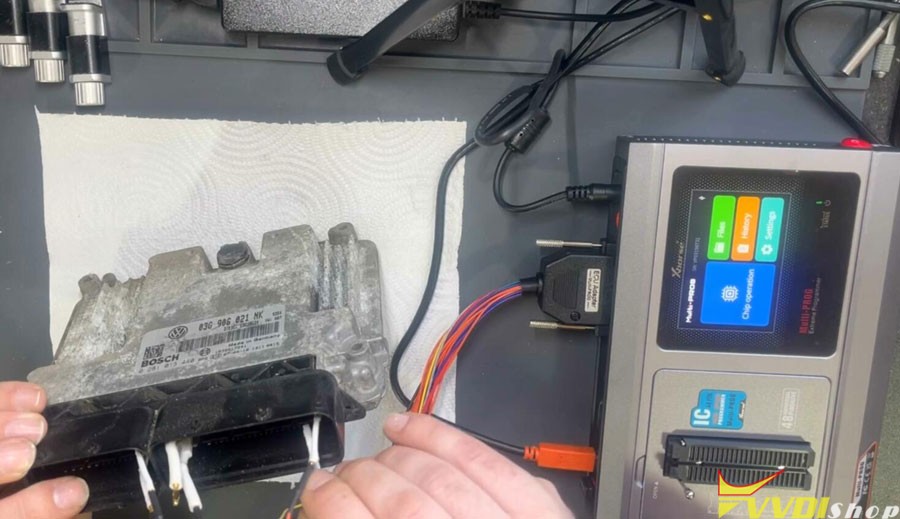
Read EXT EEPROM

Read EXT EEPROM and save
It took 40 seconds to read the eeprom on the bench mode for EDC16


Read EXT Flash and save
The process of reading the external flash took 2 minutes and 40 seconds.


Let’s read also the internal Flash. Xhorse multi prog says this future is not supported yet.
Maybe the type of ecu doesn’t have an internal flash because it’s an edc16u34 based on what the MPC have or don’t have the internal flash.

Then check how much time it will take to write eeprom.
Press Write.

Press Verify to calculate checksum online


Checksum calculation successful.

Writing data success.
We can see the whole write operation on the flash. It’s 1 minute and 14 seconds. Very fast.
How to Bind Xhorse Multi Prog with VVDI Key Tool Plus?
The benefit of combining Xhorse Multi Prog with VVDI Key Tool Plus:
Multiprog has built-in MQB48 NEC35XX license, if combine multi-prog with vvdi key tool plus, you don’t need to purchase MQB48 license on key tool plus.
Your key tool plus doesn’t need to activate MQB48 license, just load immo data read by multi prog and then program MQB48 key with key tool plus.

How to combine?
Combine multi prog and keytool plus into your xhorse account via serial number.
How to Bind Xhorse VVDI2/VVDI Prog/VVDI MB to Xhorse Account?
Program BMW CAS3+ Key with VVDI Key Tool Max Pro and Godiag
Godiag BMW CAS2/CAS3 test platform tested working perfectly with xhorse vvdi key tool max pro.
Example:
program BMW CAS3+ key with key tool max pro and godiag test platform on bench via eeprom
Pull out the CAS3+ module, read eeprom with vvdi prog or multi prog programmer.
NOTE:
key tool max pro does have EEPROM function and will read BMW CAS1/CAS2/CAS3/CAS3+ eeprom, it cannot read CAS3 ISTAP version eeprom (need VVDI2 or VVDI BIMTool Pro.)
But it will read part of CAS3+ data, the data can only be used to generate dealer key.
So better read full eeprom with ecu programmer, then load to key tool max pro via i.xhorse.com online cloud center.

Then connect godiag adapter with key tool max pro via the main cable


Select Key function
Generate keys via EEPROM->Make dealer key->CAS3+ (0L15Y, 0M23S)-
Load CAS3+ eeprom file saved
Select an unused key position and program key.


Xhorse VVDI BIMTool pro also tested working fine with the godiag test platform.


VVDI BIM TOOL PRO also does CAS3/CAS3+/CAS3+ ISTAP without problems via OBD with the help of a battery maintainer.


http://blog.vvdishop.com/xhorse-vvdi-key-tool-max-pro-program-bmw-cas3-key/
How to Set up Xhorse MVCI Pro J2534 Passhru
Xhorse MVCI PRO J2534 Passthru Cable is designed for multi-vehicle and multi-protocol diagnostics, compatible with D-PDU and J2534 diagnostic standards.
.jpg)
It can meet mainstream automotive industry standards to support multiple automotive manufacturers like Audi, Lamborghini, Bentley, VW, Toyota, Honda, Ford, Subaru, Mazda, etc. Besides, it also supports CAN, CAN_PS, ISO15765…various communication protocols.
.jpg)
These original diagnostic software (ODIS, TIS, HDS, SSM4, Ford IDS, Mazda IDS) are currently compatible and more will be updated.
.jpg)
How to use Xhorse MVCI PRO?
Click “Connect” in MVCI PRO software – here we can view device info like firmware version number, serial number, etc.
Read Authorization – here we can read the device authorization status & available times.
Update Authorization – here we can update the latest authorization status & reset the available times.
Vehicle Diagnosis – here we can install the driver required for the corresponding brand so that the operation on the original diagnostic software is successful.
Upgrade – here we can upgrade software & firmware.
.jpg)
.jpg)
.jpg)
Xhorse MVCI PRO Replace VW VAS6154
For Volkswagen, Xhorse MVCI programming cable supports PDU protocol and can replace VAS6154. The detailed steps are as follows:
- Open the MVCI PRO software: Vehicle Diagnosis >> Volkswagen, uninstall the existing driver first and then install.
- Click “Yes” to install the 6154 mode, which is compatible with the PDU protocol.
- Click “No” to install the 5054 mode, which is compatible with the PassthruJ2534 protocol.
- Click “Yes” to finish the installation.
.jpg)
Xhorse MVCI PRO Diagnose HONDA
- Connect MVCI PRO J2534 cable between the vehicle module & computer.
- Run HONDA original diagnostic software to automatically read VIN number. If the VIN hasn’t automatically filled in, we’d better check whether the cable connection is successful. If the OBD voltage is detected, the signal light will be solid green.
- Click “Honda System”, here will provide a list of systems. We can perform diagnostics as needed.
Eg. Click “ONE-PUSH START >> KEYLESS ACCESS CONTROL Unit >> DTCs”, here will display the diagnostic trouble code & related description.
To clear DTCs. Click the 4th icon on the right, then press ENTER to clear codes.
Now the DTCs have been cleared.
So we can use the same method to diagnose other systems.
.jpg)
.jpg)
.jpg)
.jpg)
.jpg)
.jpg)
.jpg)
VVDI2 Program 2017 VW Jetta NEC24C64 XSMQB Smart Key
2017 VW Jetta keyless NEC 24c64+MQB couldn’t read data with cluster in service mode by pogo pin with Xhorse VVDI2, had to read eeprom and write eeprom in service mode back but after had to turn ignition on to write original file. Figured you can hotwire few fuses together to turn ignition on without key.
I did dealer key myself with data I read of a car, the key I used is Xhorse Mqb universal smart key, I’ve just put vw logo on it.
Make sure you buy one with marking XSMQB that S stands for smart
Easy Job!

