ابزار Xhorse VVDI

Xhose VVDI نرم افزار برنامه نویس اصلی و سخت افزار

ابزار Xhorse VVDI

Xhose VVDI نرم افزار برنامه نویس اصلی و سخت افزار

Xhorse Multi Prog Update Internal Error Solution

 Problem:

Failed to update Xhorse Multi Prog firmware. Try 3 different internet connections but no luck.
It failed to obtain the file download path. Server internal error.

Xhorse Multi Prog Firmware Update Server Internal Error

Possible solutions:

1. Restart the Prog software.Try again.
2. Try to re-install the software.
3. Force firmware update and try again.

Hold the Reset button on the main unit before powering on, and hold it for 5 seconds after powering on. Try to force firmware upgrade.

Xhorse Multi Prog Firmware force update

User feedback:

SOLVED: HARD reset button 5sec, after that update successfully done.

VVDI Prog Read Porsche BCM Without Cutting Wires

 Traditionally, when working with newer Porsche immobilizer systems, technicians need to remove the BCM (Body Control Module) and read CPU data directly. Using tools like Xhorse VVDI PROG to extract Porsche BCM data (2M25J/5M48H/ 1N35H) requires not only component removal but also cutting a wire near the crystal oscillator.

Read Porsche BCM by VVDI Prog Without Cutting Wires 1

Risks of Wire-Cutting:

  • PCB Damage: Excessive force during cutting may scratch the lower-layer circuit board, permanently damaging the BCM.
  • Poor Solder Recovery: Many technicians lack soldering expertise, leading to:
  • Short Circuits: Improper wire reconnection causes grounding issues.
  • BCM Failure Symptoms: Relays in the BCM may flicker continuously, and the vehicle becomes unresponsive.
  • High Failure Rate: Less experienced technicians face significantly higher risks.

Solution:

To minimize risks, an alternative method is proposed.

Component Removal Instructions for Porsche BCM (Body Control Module)

Front-Side Component Removal:

The following components on the front side of the PCB must be removed:

  • Diode

Critical Note: Orientation must be correctly identified and maintained. Incorrect placement will cause failure.

Read Porsche BCM by VVDI Prog Without Cutting Wires 2

  • 0-ohm resistor
  • Crystal oscillator

Back-Side Capacitor Removal:

After front-side removal, capacitors on the PCB’s back side must also be detached.

Location varies by CPU model:

2M25J

1N35H

5M48H

Read Porsche BCM by VVDI Prog Without Cutting Wires 3

Read Porsche BCM by VVDI Prog Without Cutting Wires 4

This way we don’t need to cut the wires.


Xhorse also has Porsche BCM solder free adapter which is safer than two soldering method.

How to Cut Honda New Style Key with Xhorse Dolphin XP005L?

 How to duplicate the new Honda emergency keys with the Xhorse Dolphin XP005L with M5 Clamp?


Here are the tips to cut New Style Honda Emergency key cut on the Xhorse Dolphin II or Condor II?

Cut New Honda Emergency Key with Xhorse Dolphin II 1

Select 2021+ Civic and then profile HONDA. Or newer MDX and profile ACURA.
The two sides of the key are cut differently. Take a very careful look at the tip of the key, one side is wider than the other.
A axis should have you with the key-ring connector facing up into the air. Decode A axis and then cut A axis.
Then switch machine to B Axis. Decode customer key with key ring connector facing down to the floor, then cut new key B axis.

Honda has introduced a new keyway for its 2021 and newer smart keys. These emergency keys are thinner, double-sided, and made of steel in their OEM form. However, for easier cutting, brass keys can be used as an alternative. In this guide, we’ll walk through the process of cutting one of these keys using the Xhorse Dolphin 2 key-cutting machine.


Key Features of the New Honda Emergency Key

Double-Sided Design: The key has an “A” side and a “B” side, each with distinct cuts.

Thin Profile: The key is noticeably thinner than previous models.

Material: OEM keys are steel, but brass keys are easier to cut and work well for duplicates.


Step-by-Step Cutting Process
1. Identifying the Key Sides

Before cutting, it’s crucial to identify the “A” and “B” sides of the key:

A Side: Look for a small slope at the tip of the key when held in a specific orientation.

B Side: When flipped over, the slope will appear in the opposite direction.


Cut New Honda Emergency Key with Xhorse Dolphin II 2

Cut New Honda Emergency Key with Xhorse Dolphin II 3

Cut New Honda Emergency Key with Xhorse Dolphin II 4

2. Setting Up the Xhorse Dolphin 2

Navigate to the key selection menu on the Dolphin 2. The new Honda key is labeled as “SY” in the machine (note that this naming may vary).

Enter the cut codes obtained from decoding the lock. In this example, the cuts for the “A” side were 3 5 1 3 1.

Cut New Honda Emergency Key with Xhorse Dolphin II 5

Cut New Honda Emergency Key with Xhorse Dolphin II 6

Cut New Honda Emergency Key with Xhorse Dolphin II 7

3. Cutting the “A” Side

Secure the key in the machine’s vice with the “A” side facing up.

Select Line 3 as the reference point for clamping.

Initiate the cutting process and allow the machine to complete the cuts.

Cut New Honda Emergency Key with Xhorse Dolphin II 8

Cut New Honda Emergency Key with Xhorse Dolphin II 9

Cut New Honda Emergency Key with Xhorse Dolphin II 10

4. Cutting the “B” Side

Flip the key over and secure it again with the “B” side facing up.

On the machine’s screen, switch from the “A Side” to the “B Side” option.

Enter the cut codes for the “B” side (in this case, 3 5 4).

Proceed with cutting the “B” side.

Cut New Honda Emergency Key with Xhorse Dolphin II 11

Cut New Honda Emergency Key with Xhorse Dolphin II 12

Cut New Honda Emergency Key with Xhorse Dolphin II 13

Cut New Honda Emergency Key with Xhorse Dolphin II 14

Cut New Honda Emergency Key with Xhorse Dolphin II 15

Cut New Honda Emergency Key with Xhorse Dolphin II 16

5. Finishing and Testing

Remove any brass flakes or debris from the key after cutting.

Test the key in the lock to ensure it operates smoothly. The key should only insert one way and turn without issues.


Tips for Success

Double-Check Orientation: Always verify the “A” and “B” sides before cutting to avoid errors.

Use Brass for Practice: If you’re new to cutting these keys, brass blanks are more forgiving than steel.


Conclusion

Cutting the new Honda emergency key on the Xhorse Dolphin 2 is straightforward once you understand the double-sided design and proper orientation. By following these steps and paying attention to detail, you can create a functional duplicate key with ease.


www.vvdishop.com

Xhorse VVDI Prog Read ChangAn MT22.1 ECU

 How to read and write ChangAn MT22.1 ECU with Xhorse VVDI Prog programmer?

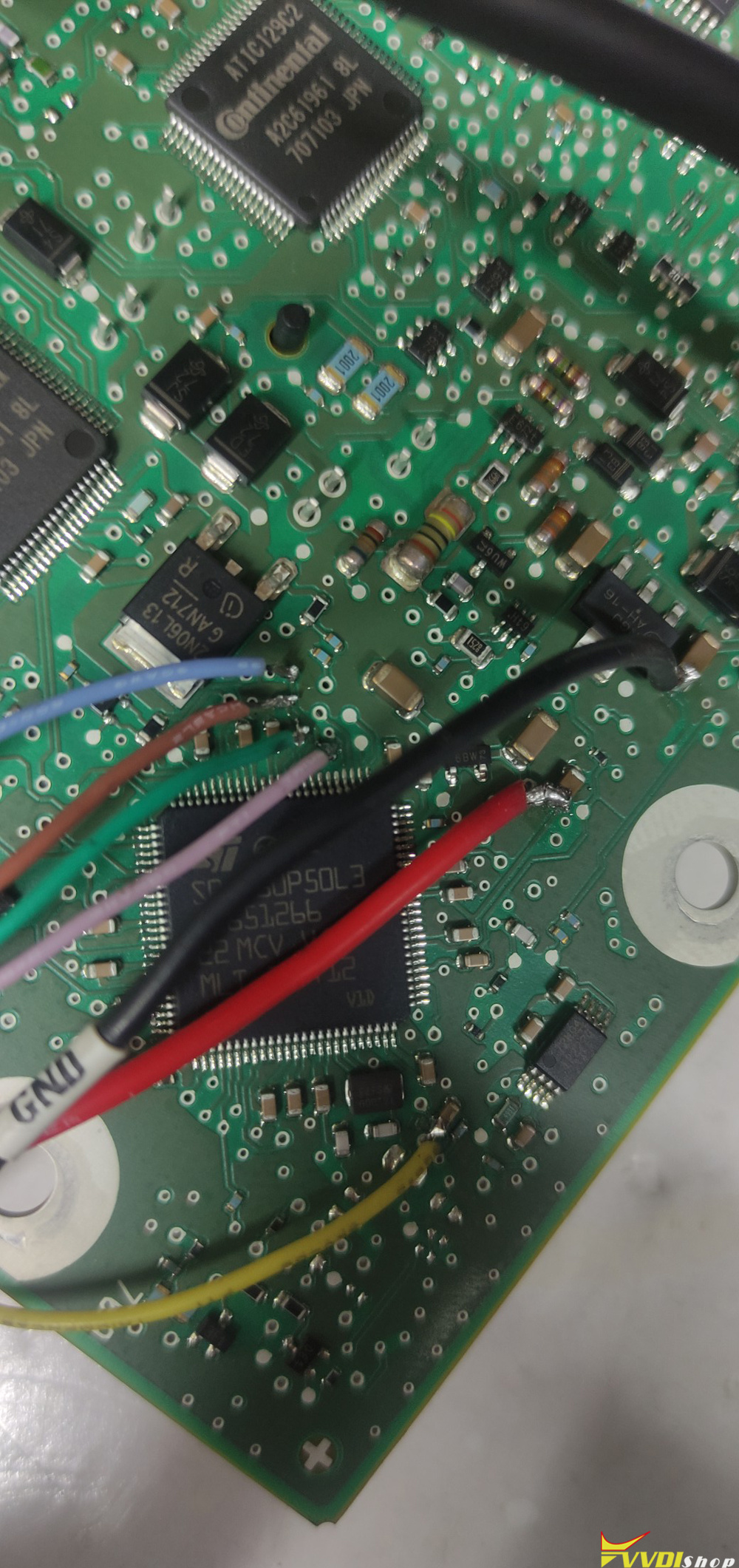
1. Cut the engine computer board, find the wiring diagram, and then use a multimeter to point out the pins to facilitate soldering.

2.  After soldering the wires, open the VVDIProg software.

Select 2 Microcontroller- Motorola MC9S12 series- MC9S12XET256 encrypted.

3. Hit Read Chip ID and identify ID first.

4. Click on Unlock if the chip has a password.

5. Then click on Read data and read the D-FLASH and PLASHF data.

6. Write modified data to the ECU.

Images attached:

Xhorse VVDI Prog Read ChangAn MT22.1 ECU  1

Xhorse VVDI Prog Read ChangAn MT22.1 ECU  2

Xhorse VVDI Prog Read ChangAn MT22.1 ECU 3

Xhorse VVDI Prog Read ChangAn MT22.1 ECU 3

Xhorse VVDI Prog Read ChangAn MT22.1 ECU 5

Xhorse VVDI Prog Read ChangAn MT22.1 ECU  6

Xhorse VVDI Prog Read ChangAn MT22.1 ECU 7

Xhorse VVDI Prog Read ChangAn MT22.1 ECU 8

Xhorse VVDI Prog Read ChangAn MT22.1 ECU 9

How to Connect Xhorse EWS4 Adapter with VVDI Key Tool Plus?

 Procedure to program BMW EWS4 key with xhorse vvdi key tool and EWS4 adapter:

1). Read eeprom.

2). Make dealer key (pcf7935 or Universal xhorse xt27a super chip transponder generated as vw id33),

Don’t write file back to EWS!!! This system no need to write back.

Put everything back, start the car. Job done.


Tips to install the Xhorse EWS4 adapter with key tool plus:

Xhorse adapters for reading dumps are quite reliable if you know how to use them.

Before installing the EWS4 adapter, the contacts should be cleaned several times.
After installing the adapter, you need to read the dump 2–3 times and save it after each read.
Then you compare all the dumps you have read (Xhorse Key Tool Plus has this feature).
If they are identical, you can proceed to create a dealer key and write the generated file back to the EWS.
If you read the dump with errors — which often happens when reading via adapters — and then create a dealer key and write the new dump back, that can permanently damage the EWS.


There are two ways to connect the Xhorse EWS4 adapter with key tool plus:


Way 1: Connect Key Tool Plus with EWS4 adapter via multi-funtion converter.

Connect Xhorse EWS4 Adapter with VVDI Key Tool Plus 1

Connect Xhorse EWS4 Adapter with VVDI Key Tool Plus 2

Way 2: 

Connect key tool plus with EWS4 adapter via XDNP14 DB15-DB25 EWS4 adapter.

Connect Xhorse EWS4 Adapter with VVDI Key Tool Plus 3

Alternative approach:
The cheapest and most reliable way is often to source a complete EWS and DME from the same vehicle (for example, from a junkyard), install them together, and program new keys.
This avoids the risks of bit errors, incorrect dumps, and complex synchronization with existing modules.
Once installed, the new EWS, DME, and keys will work seamlessly together, resolving the problem without the need to restore corrupted dumps.